Case study 03 · Product design
Gamifying the Sales Pipeline
An internal platform for Account Executives — CRM, performance dashboard, and leaderboard in one place.
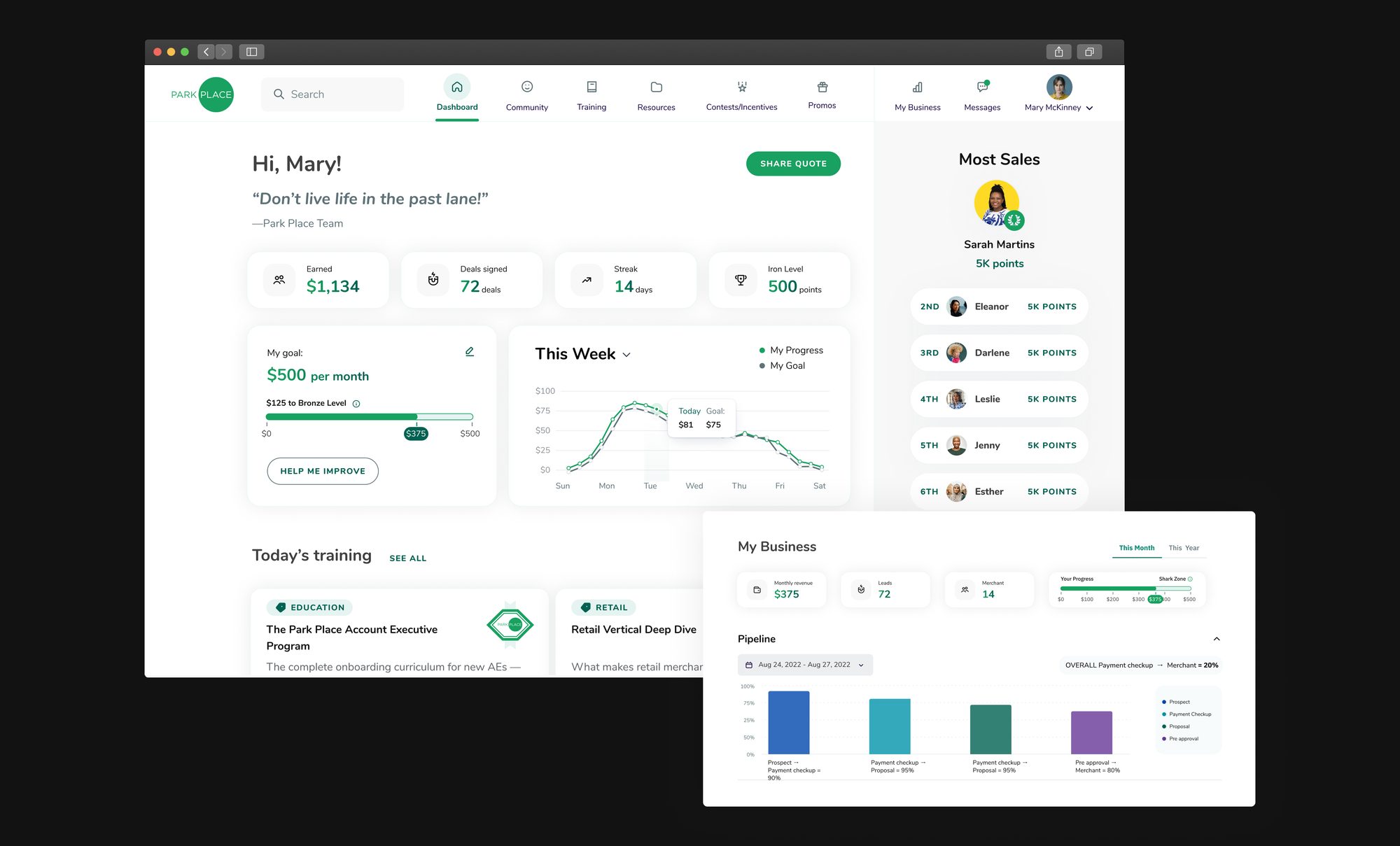
A tool Account Executives had to use — the goal was making them want to.
Park Place needed a single platform for its Account Executives (AEs): a place to manage their sales pipeline, complete required training, access marketing resources, and stay connected to the wider team. Five functional areas — Dashboard, Community, Training, Resources, My Business — under one roof.
The risk with a tool like this is obvious: AEs already have a job to do, and a platform that reads as "one more system to update" gets resented, then ignored. The business framing wasn't "build a CRM" — it was "build a CRM AEs actually want to open every day."
Goals:
Increase daily engagement
AEs should open the platform because they want to check their standing, not because a manager told them to.
Make performance visible and social
Points, streaks, and a leaderboard — so progress isn't a private number only a manager sees.
Lower the "CRM feels like homework" barrier
Reframe data entry (updating a pipeline stage, logging a prospect) as something with a visible, immediate payoff.
Support genuinely dense data
Pipelines, tables, and maps needed room to breathe — the UI couldn't sacrifice data density for decoration.
Three moments before the CRM: welcome, the goal, and the network.
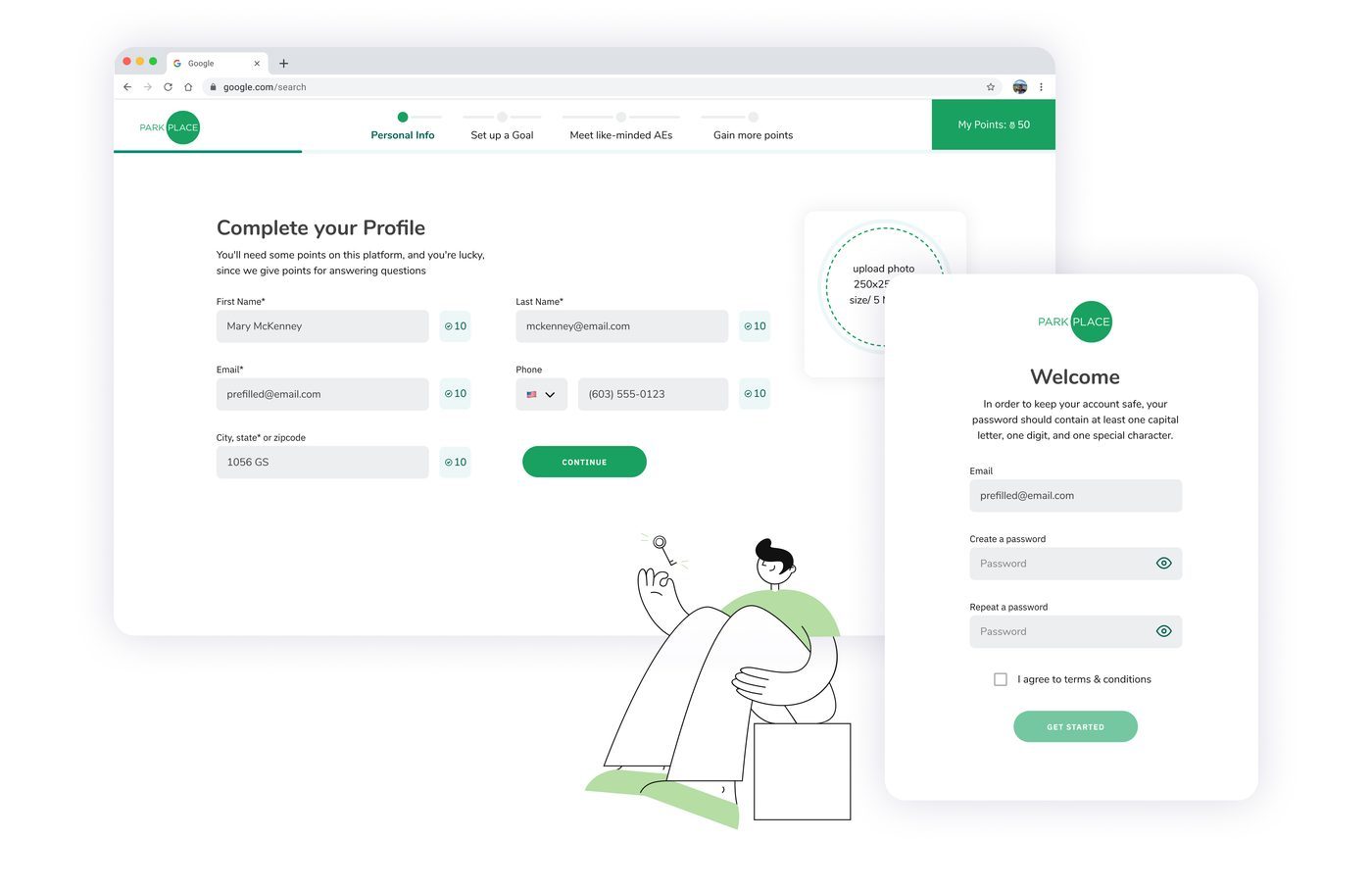
Onboarding is built around three distinct moments rather than a flat list of steps — getting settled in, setting a real goal, and finding people. Every step earns points, visible the entire time.
Welcome & Profile
Rather than opening on a blank pipeline, new AEs are walked through a short sequence designed to make the platform feel personal and social before it feels like work. Every step earns points, visible the entire time — a running counter that turns setup into something closer to leveling up.
Set Up a Goal
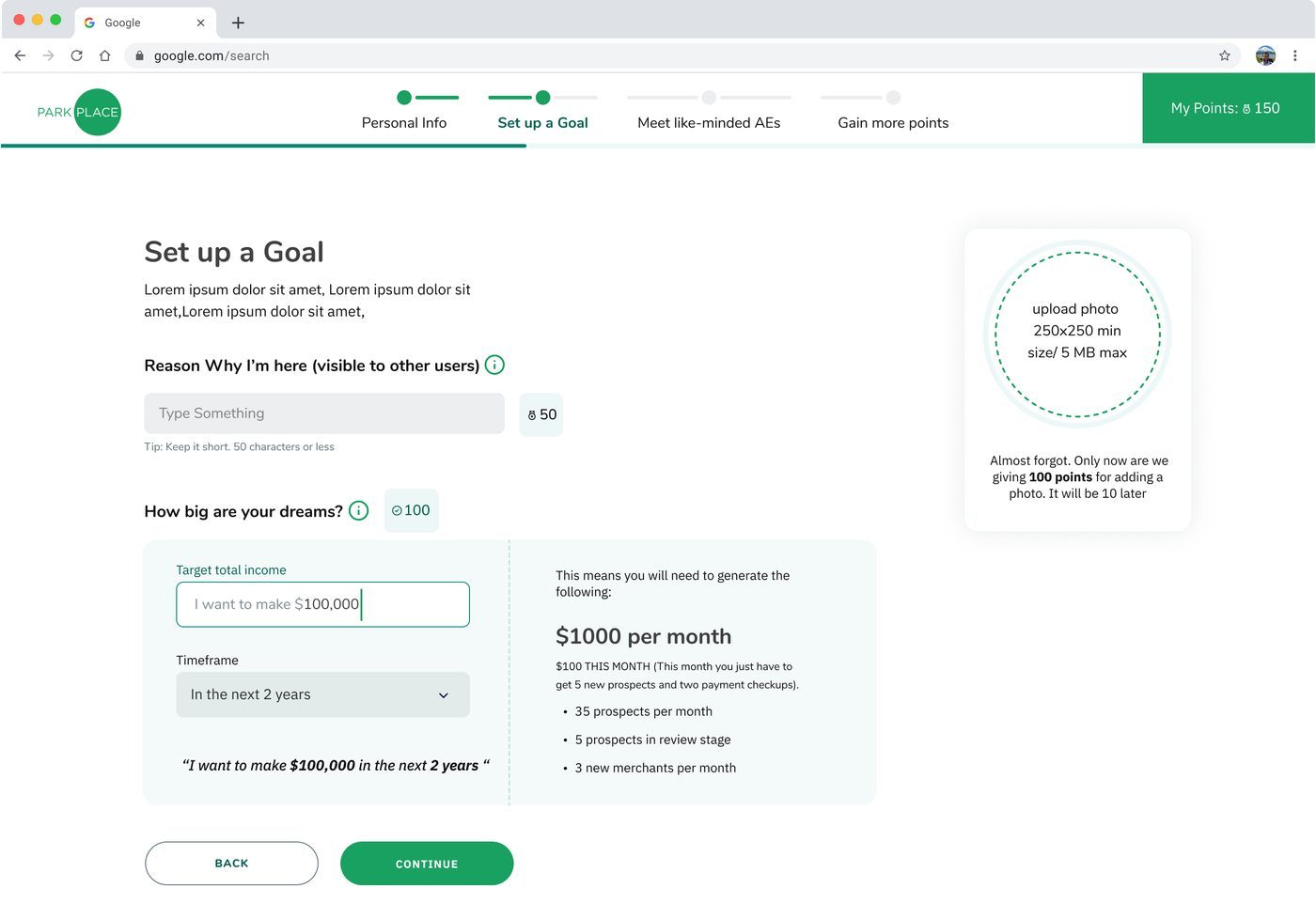
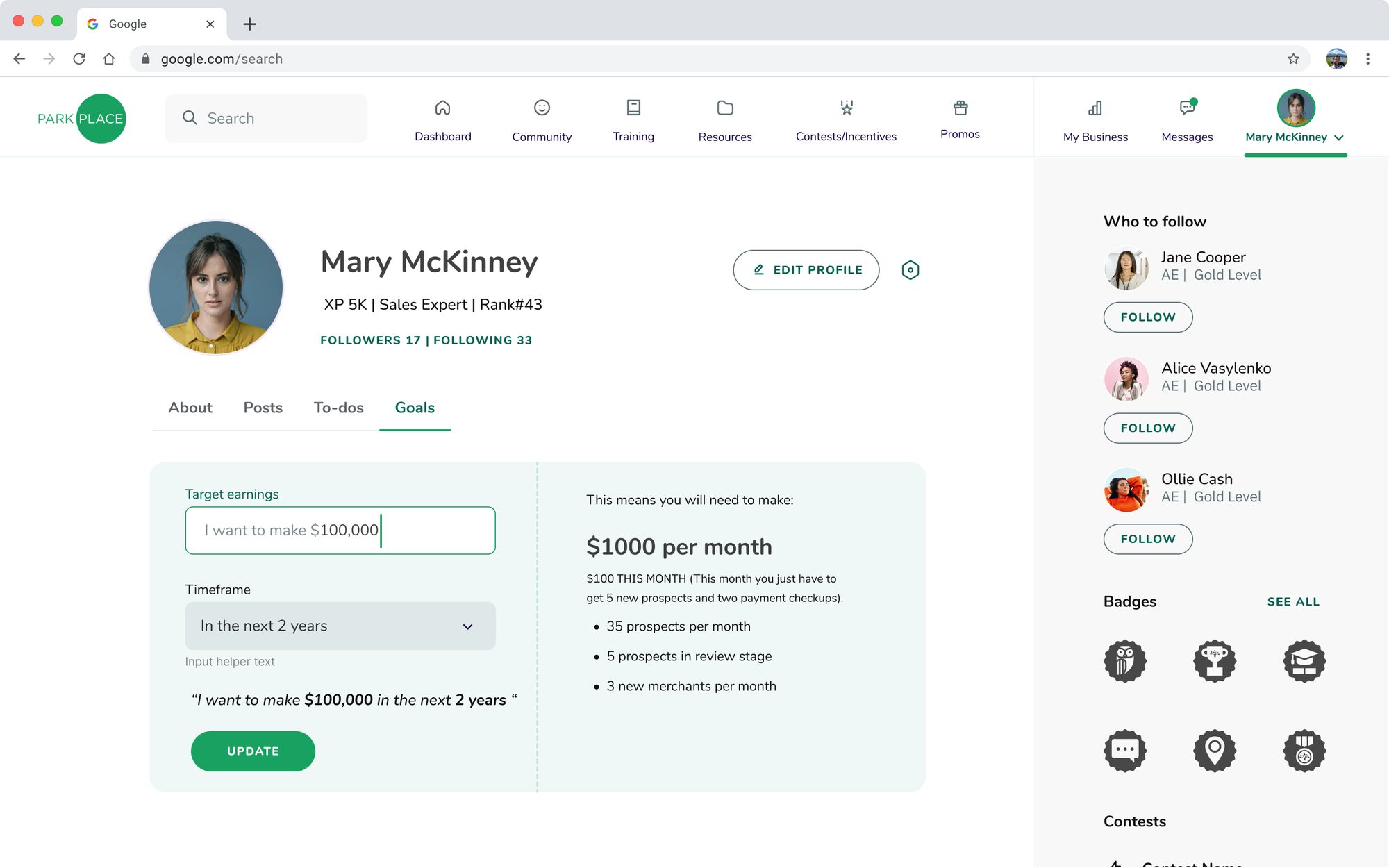
The centerpiece of onboarding, and the decision I pushed hardest for.
The real goal was retention — get AEs opening the platform daily.
My recommendation: gamify the goal itself, so hitting a number feels like leveling up.
"$100,000 in 2 years" becomes $1,000 a month → 5 new prospects, 2 payment checkups this month.
Big goals only motivate once they're small enough to act on today.
Meet & Follow
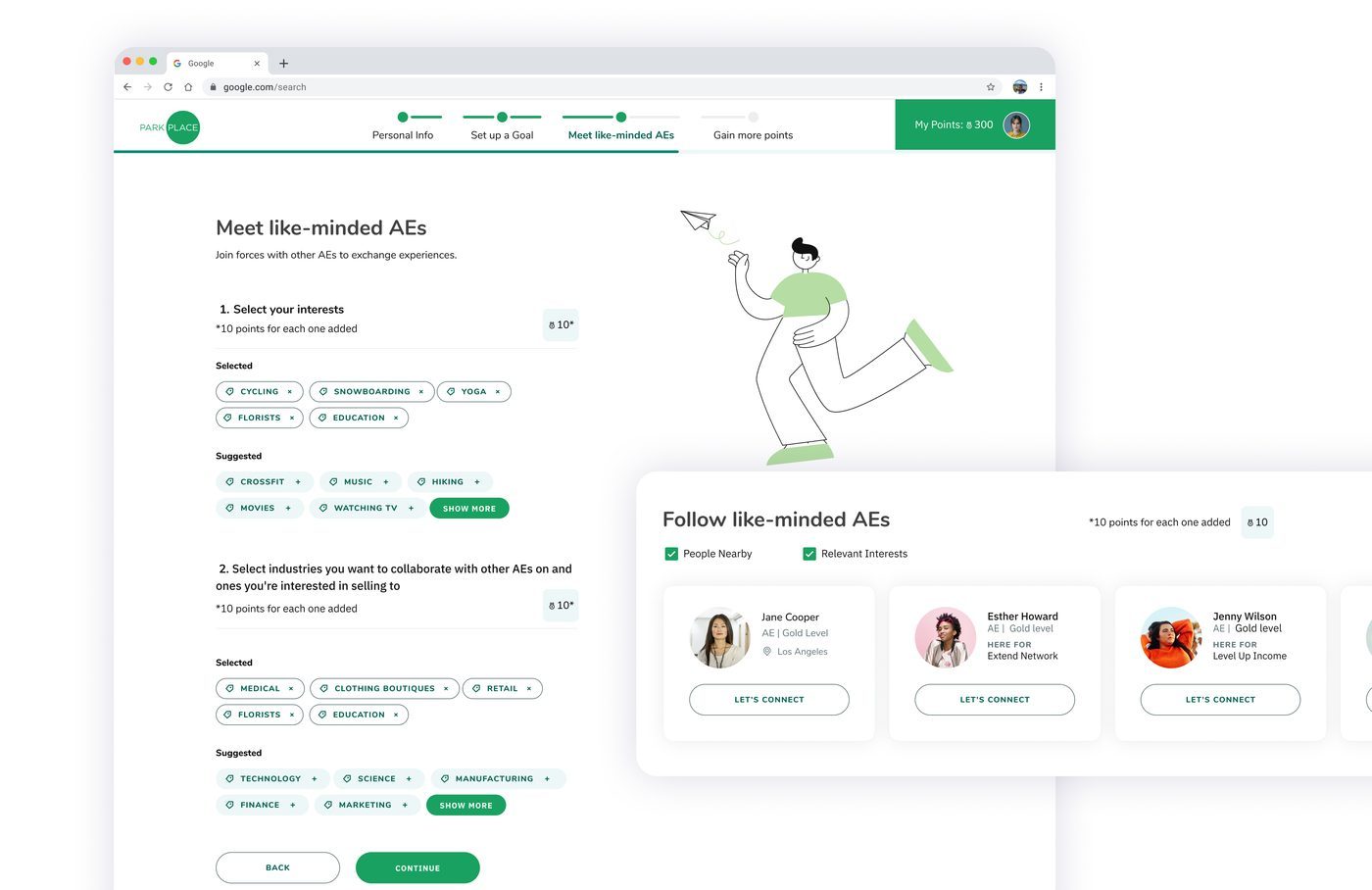
Selecting interests and industries, then following suggested peers and joining groups — bundled together because they're really one moment: socialization.
This step has its own gamification technique: 10 points for every interest or industry selected, and 10 points for every AE followed or group joined — turning network-building into the same quick-win mechanic as the rest of onboarding. By the time an AE reaches the CRM, they already have a network, not a cold start.
Not a status page — a reason to come back.
This is the screen carrying the whole retention strategy. Checking in only becomes a daily habit if the payoff is immediate — so instead of requiring a tour through five separate tabs, the Dashboard surfaces what matters from each one in a single glance.
Status & Progress
Points and level, plus a goal-vs-actual chart precise enough to compare today's number against today's target — progress you can act on, not just admire.
Urgency & Momentum
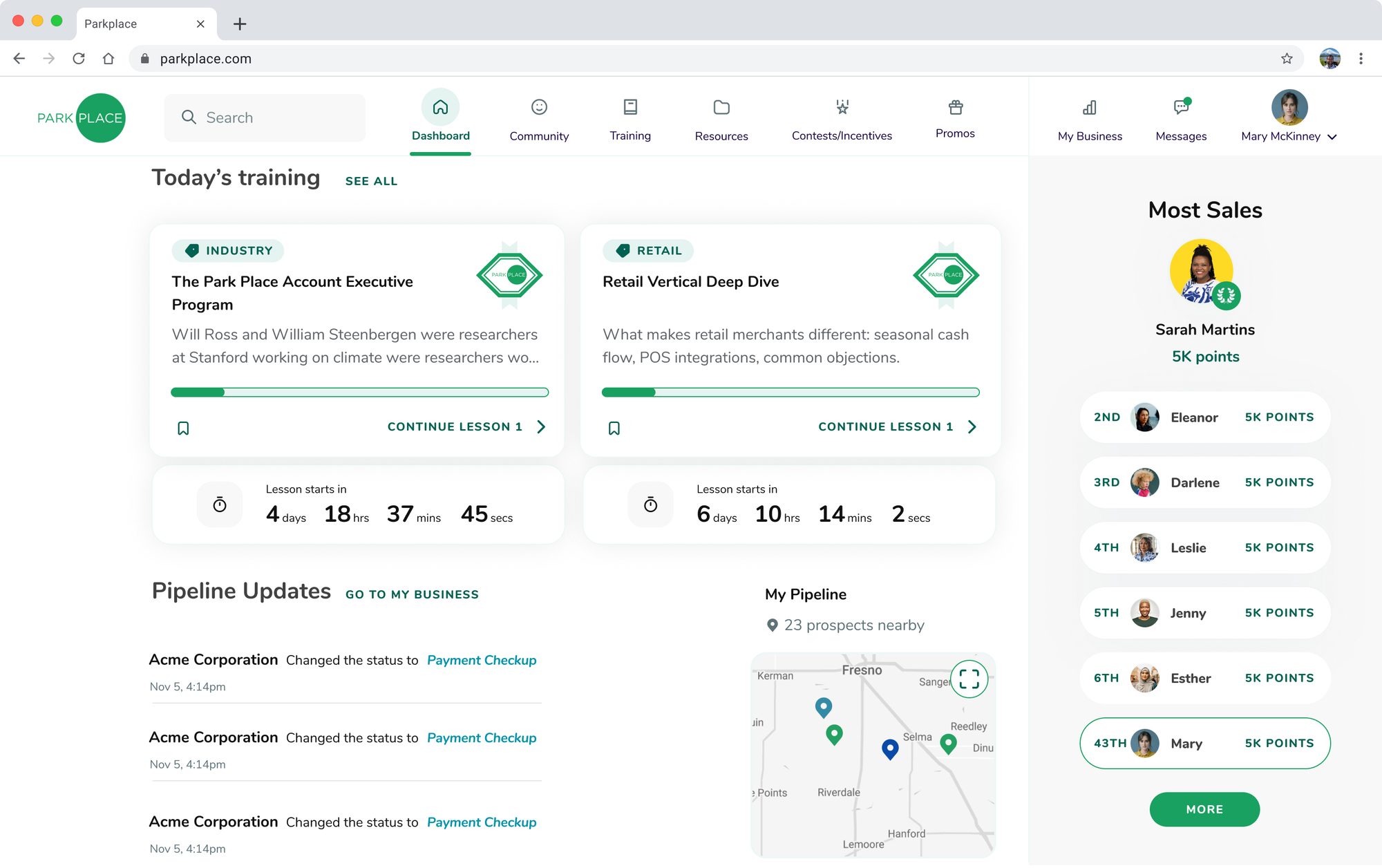
A streak counter, countdown timers on lessons, and training progress bars — each one giving a reason to come back at a specific moment, not just eventually.
Social Proof
A leaderboard that stays pinned to your own rank even at 43rd, team contest participation, and a shareable daily quote — performance made visible, not private.
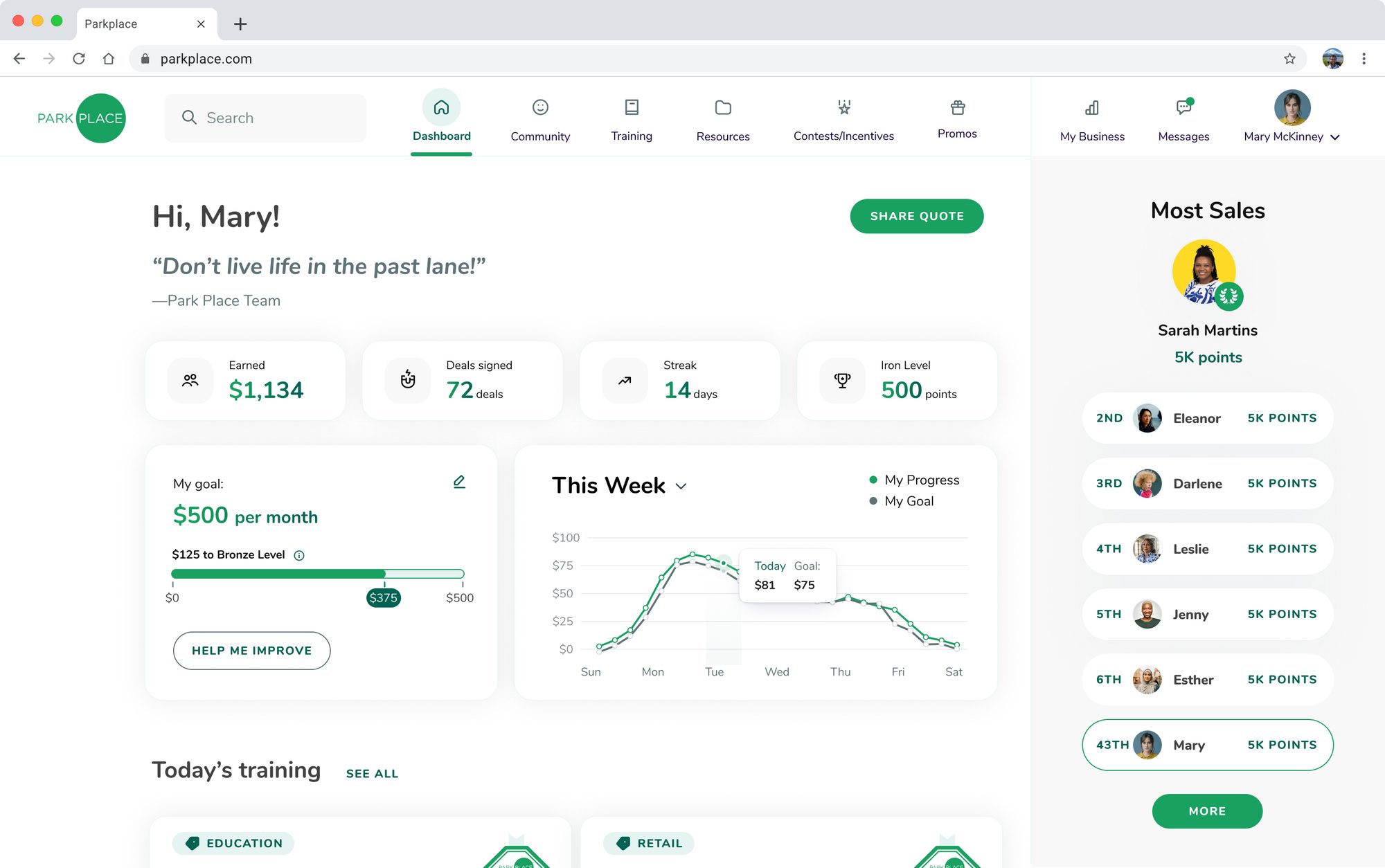
Dashboard: everything that earns a daily open, in one glance.
Sticky Sidebar, Ticking Clock
Comparison and urgency, side by side. Pinning Mary's own rank at 43rd (not hiding it) keeps the gap to 1st visible enough to feel closable — the point of a leaderboard isn't the top spot, it's giving everyone something to close. The lesson countdowns use a different lever: a progress bar can wait forever, but a clock ticking toward zero can't.
Why the goal stays editable elsewhere
The full goal-editing form lives on Profile's Goals tab, not here. Editing is a deliberate, occasional action — keeping it separate stops the daily-glance screen from turning into a form.
Different tasks need a different shape of the same data.
My Business is where the actual CRM work happens. A single toggle switches between Board, Table, and Map views of the same pipeline — so an AE never has to leave the tool to see their work differently.
A short recording of the same pipeline switching between Board, Table, and Map with a single toggle — the point isn't any one view, it's how fast an AE can reframe the same data for a different task.
Board
Kanban-style columns — Prospect → Payment Checkup → Proposal → Pre Approval — with a contact card per prospect. The default view, built for a quick "where does everything stand" check.
Table
The same prospects as a dense, sortable grid with bulk actions — edit, compose email, add note, attach file. Built for working a list at speed rather than browsing it.
Map
Every prospect and merchant plotted geographically, color-coded by stage and filterable by nearest — useful the moment territory matters more than funnel position.
The Pipeline Funnel
Stage-to-stage conversion shown as a bar chart — Prospect → Payment Checkup converts at 90%, but Pre Approval → Merchant drops to 80%. That's the number that tells an AE, or their manager, exactly where attention is actually needed, instead of leaving conversion buried inside four separate percentages someone would have to calculate themselves.
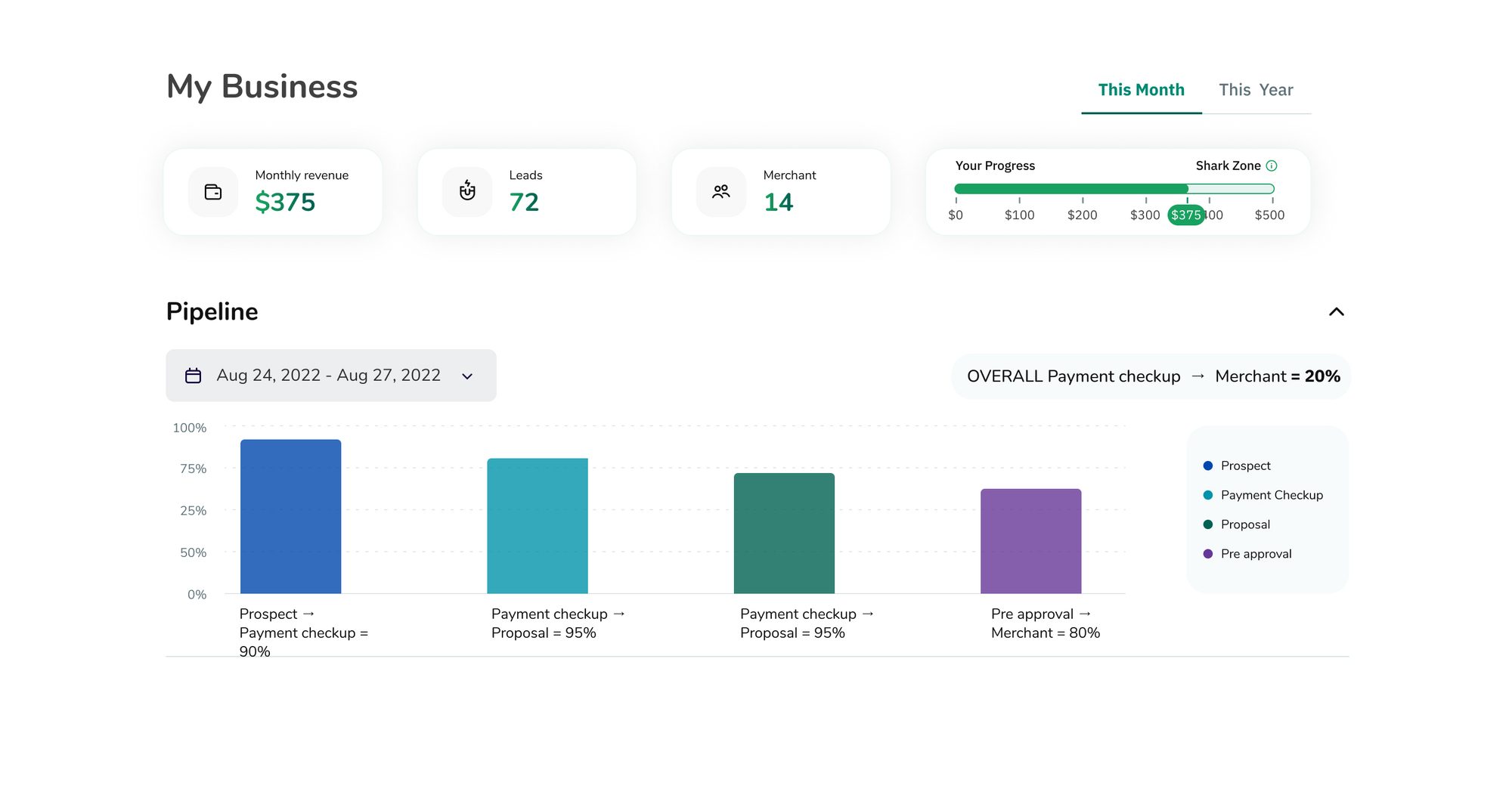
Making performance visible is what makes it motivating.
The stakeholder goal was explicit: progress shouldn't be a private number only a manager sees. Points, streaks, and a leaderboard turn individual performance into something social, visible, and a little competitive.
Why gamify a CRM at all?
Because the alternative — a plain data-entry tool measured privately by a manager — has no reason to be opened outside of obligation. Making progress public and a little competitive gives AEs a reason to check in that has nothing to do with being told to.
Badges
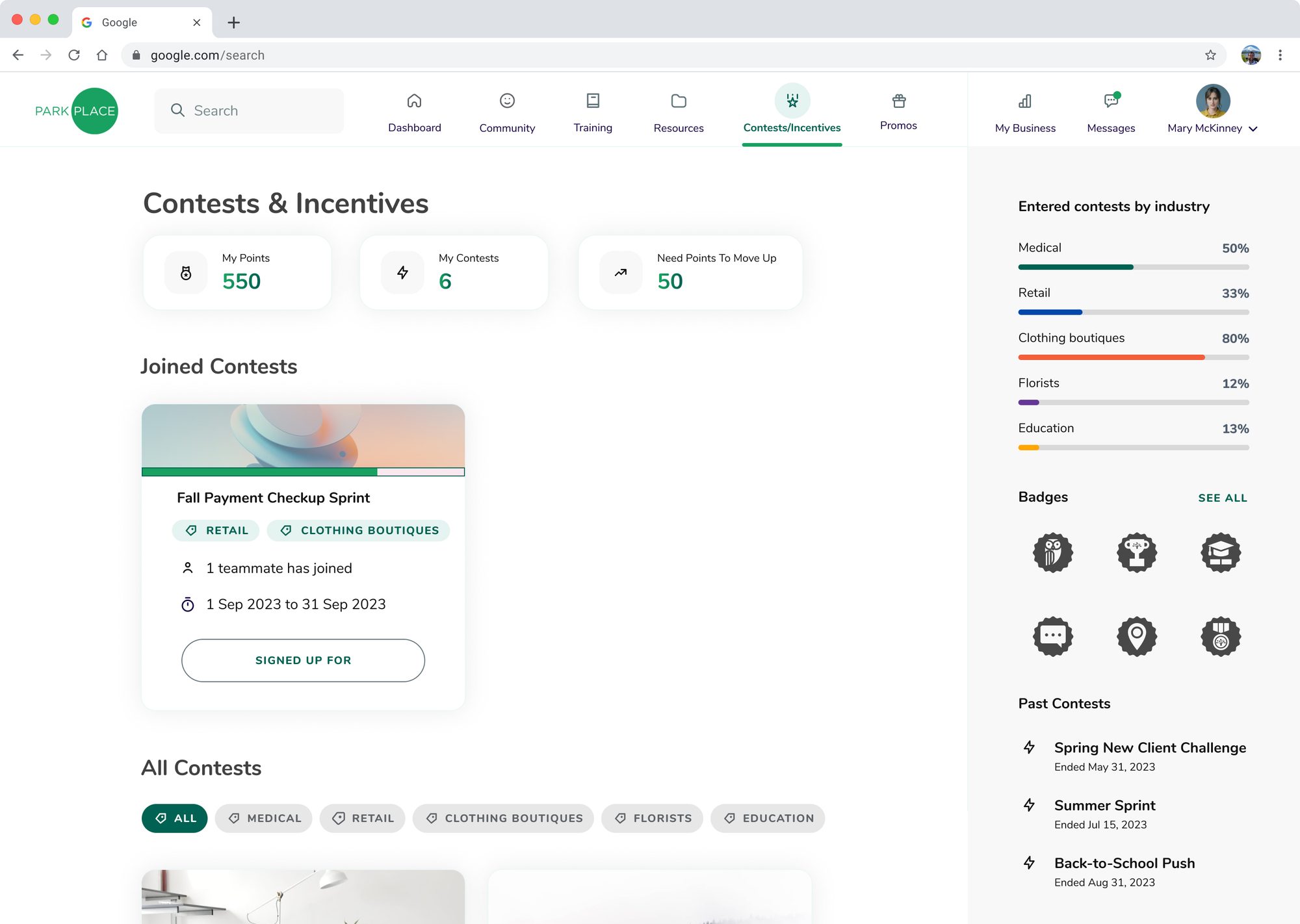
A separate reward layer from points and levels — six achievement icons in the Contests/Incentives sidebar, with a "See all" implying more exist beyond what's shown. Badges reward specific accomplishments rather than accumulated volume: a badge says "you did this particular thing," where a point total just says "you did enough things."
Thresholds and Trophies
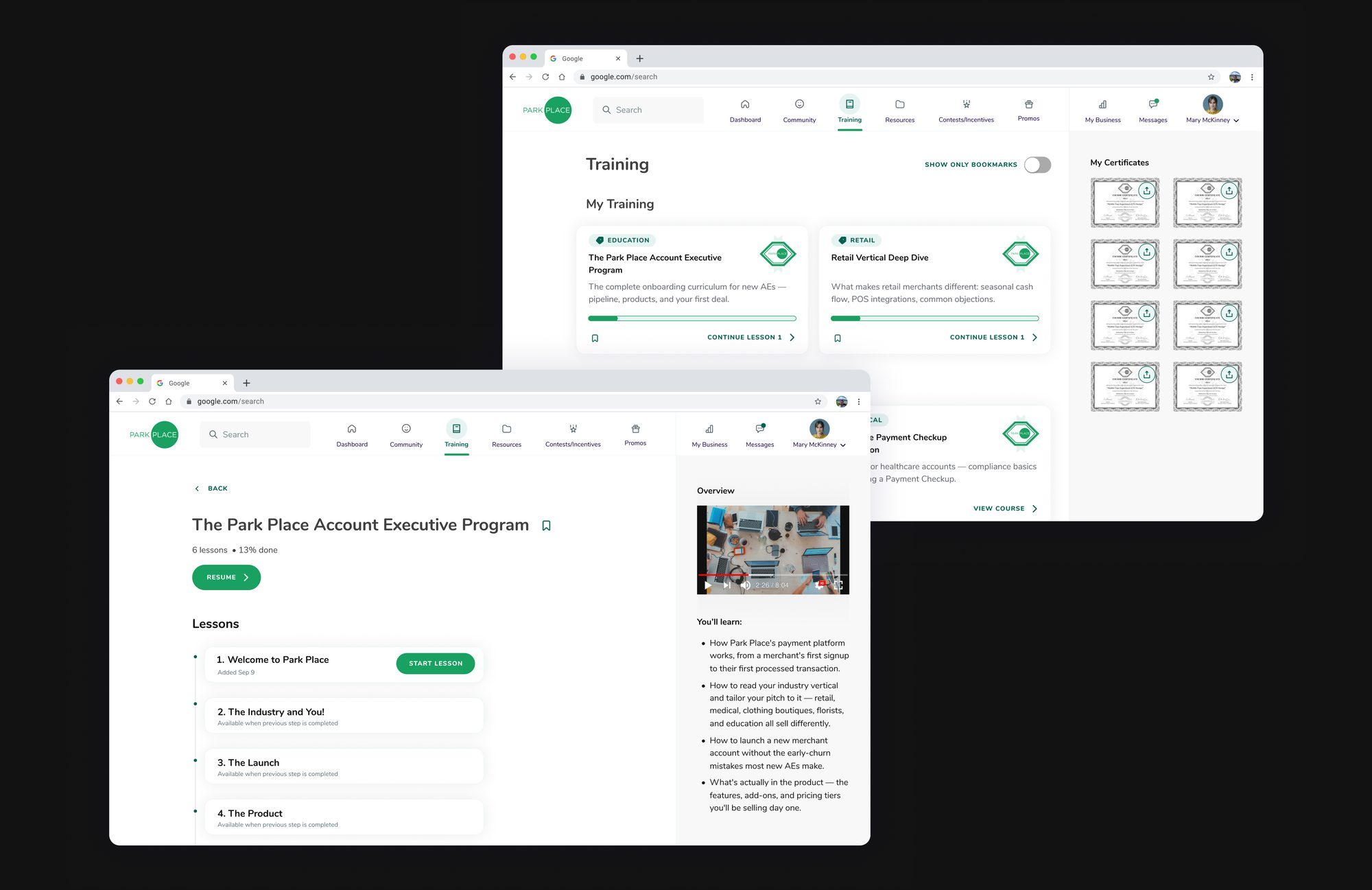
Points work as a close, specific threshold — "Need Points To Move Up: 50" — not an open tally, with an industry chart adding a second axis of comparison. Certificates work differently: eight earned, downloadable certificates turn one finished course into a permanent, presentable object. Proof, not just progress.
Besties, and Building Your Own Structure
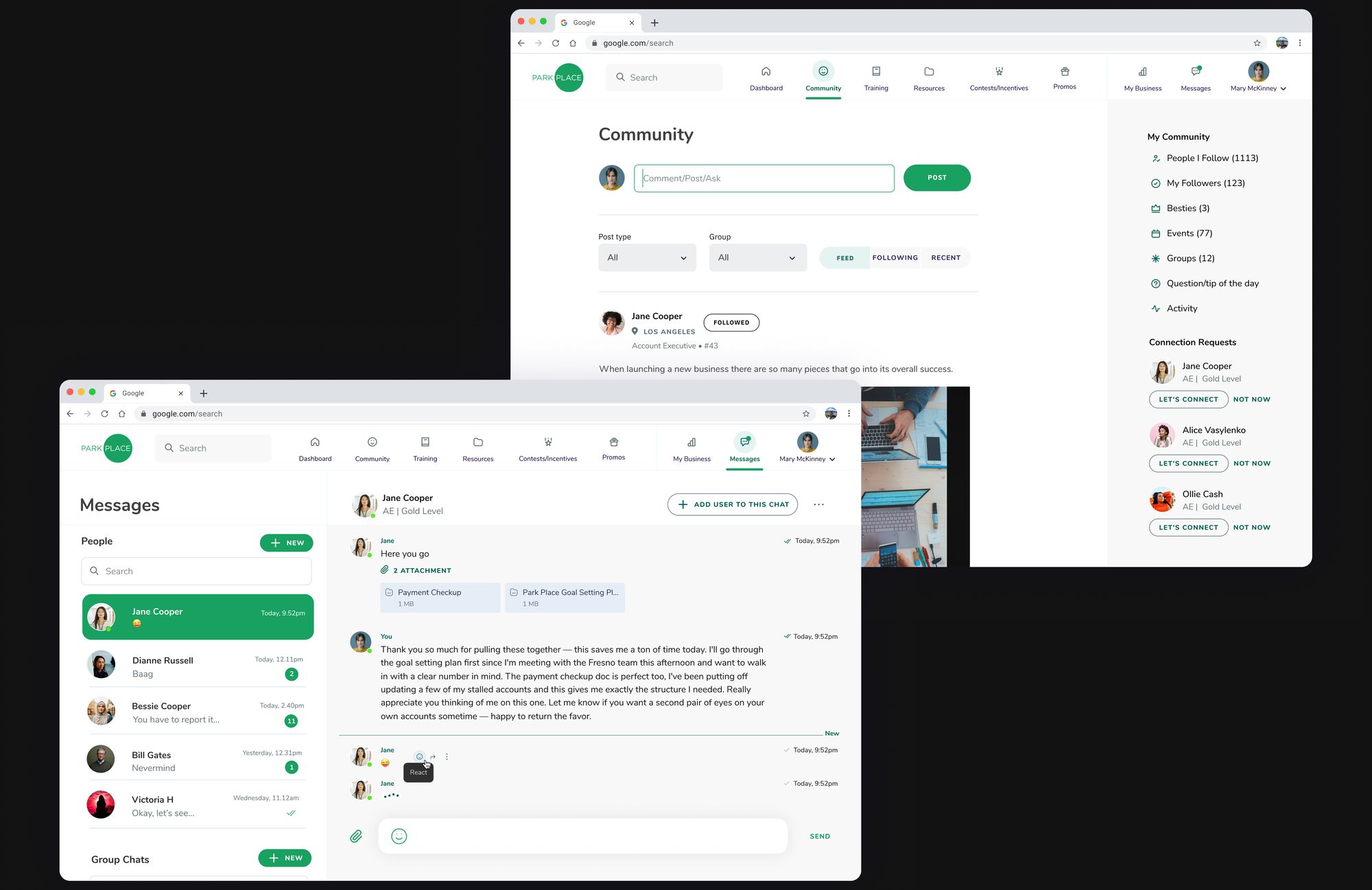
Community breaks connections into explicit tiers — People I Follow (1113), My Followers (123), and a much smaller Besties (3) — a scarce relationship type sitting above ordinary follows. Lower down, "Organize a meet-up in 2 minutes and gain a lifetime of friendship!" flips the usual direction of gamification: instead of the platform handing out a reward, it nudges the AE to create the social structure themselves.
One idea, told through every screen.
Turn sales work into something concrete, visible, and a little bit like a game — from the goal set on day one, to the dashboard checked every morning, to the four different ways an AE can look at their own pipeline.